
Package & Session Tracking
Beauty Salon Package and Session Tracking Software
The biggest headache of salons that sell packages is the question "how many sessions does each client have left?" Clivio shows each client's remaining entitlement for every service instantly.
What does it offer?
- Several services in one package, with paid and gift sessions for each
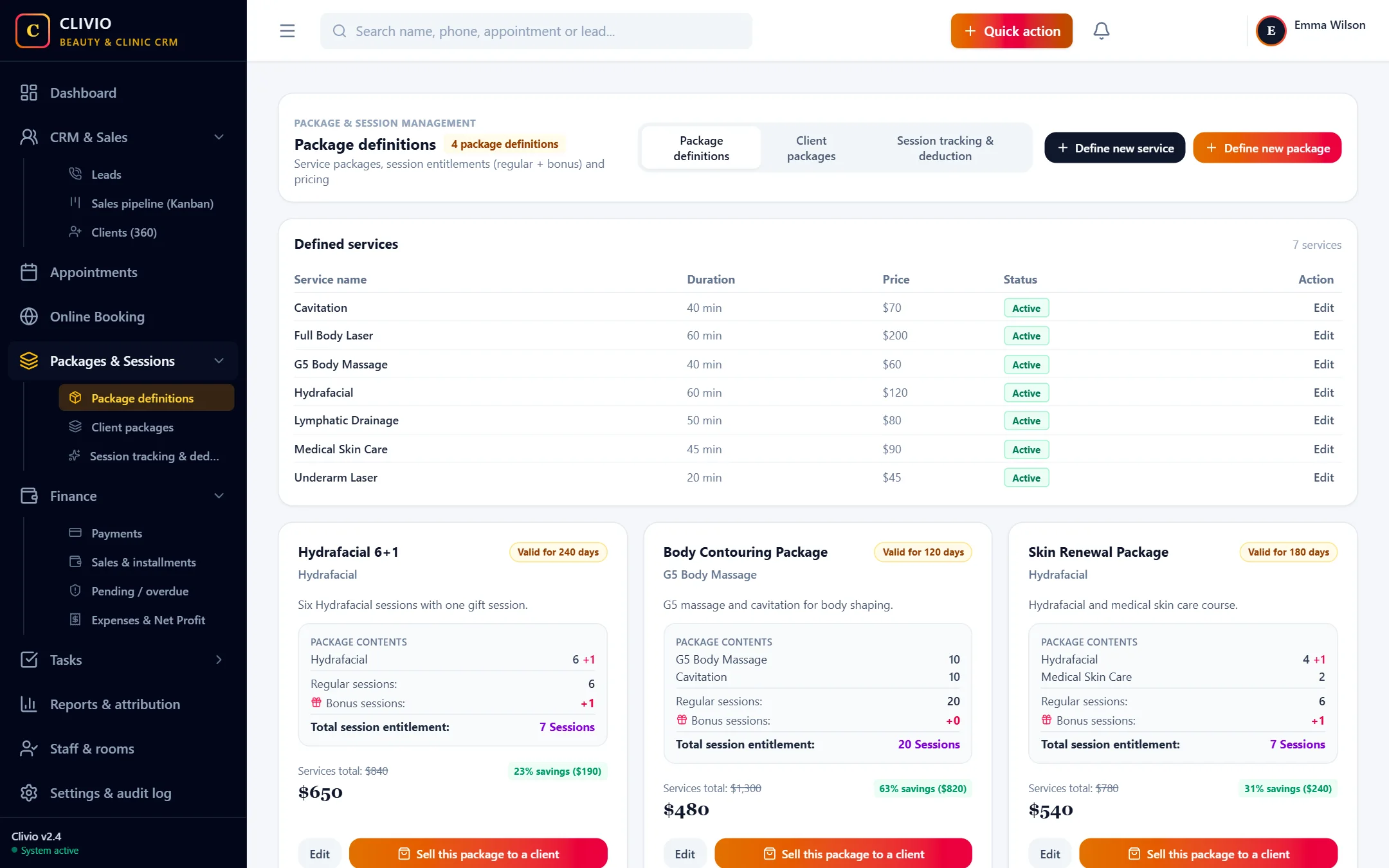
- Shows the advantage between the package price and the total of its services
- Automatic session deduction when an appointment is completed
- Reverse a wrong deduction by writing a reason; every movement is on record
- Create a package for one client and sell it in a single step
Combine several services in one package
A package does not have to be made of a single service. For example a "Body Contouring Package" can include 10 sessions of G5 massage and 10 sessions of cavitation; a "Skin Renewal Package" can carry 4 sessions of medical skin care, 1 gift session and 2 sessions of carbon peeling. The paid and gift sessions of each service are tracked separately.
On the package definition screen, the total if the services were bought one by one is shown next to your package price; you see the advantage you offer the client as an amount and as a percentage.
Visit logic: a service not performed does not disappear
In multi-service packages, one visit is one session of every service in the package. If the client does not have one of the services done during a visit, that entitlement carries over to the next visit; for example, next time skin care can be done twice. "Remaining visits" and the remaining entitlements per service are always up to date on the client card.
Session deduction is automatic, reversal is controlled
When an appointment is closed with "Complete & deduct session", the relevant sessions are deducted from the package, and a second deduction cannot be made for the same appointment. Manual deduction is also possible. A session deducted by mistake is reversed by writing a reason; the reason and the user who did it stay on record. With the permission system you can keep the reversal permission to managers only.
Validity period and package status
Packages are valid for the number of days you set from the date of sale. The status is tracked as "Active", "Used up", "Expired" or "Cancelled". Smart Follow-up finds packages that are about to expire or are running low on sessions for you, and creates a reminder to invite the client for an appointment.
A package for one client
If a client does not want one of the standard packages, on the sale screen you can use the "Create a package for this client" option to set the services, session counts and price and sell it in the same step. A client-specific package does not appear in your general package list and is sold only to that client.
A sold package does not change
Even if you edit a package afterwards, the contents and price of packages already sold are not affected; the state at the time of sale is kept.
Put package and session tracking in order today
Start Your 7-Day Free TrialFrequently Asked Questions
About Package & Session Tracking
Related features
Take your business digital today
Try it free for 7 days. No setup fee, no credit card needed.